This guide is for tax firms and technology partners — including API integration partners — who want to leverage existing or future IRS authorizations between their clients and their in-house tax professionals using CAF Connect, rather than (or in addition to) using TaxNow's standard in-app authorization flow, TaxNow Connect. It covers what CAF Connect requires, why it sometimes fails to deliver reliable results, and the specific habits that make it work well.
The short version: CAF Connect is powerful because it (i) removes the need for new client signatures for pre-existing authorizations, (ii) unlocks near-instant transcript access, and (iii) removes the need to introduce a TaxNow designee into the authorization flow. But it only works as well as the underlying authorization records it depends on. Most of the issues firms run into with CAF Connect are not TaxNow issues — whether accessed via the app or the API — they're gaps in how consistently the firm has managed and understands the scope of its own IRS authorizations. This guide is meant to close those gaps.
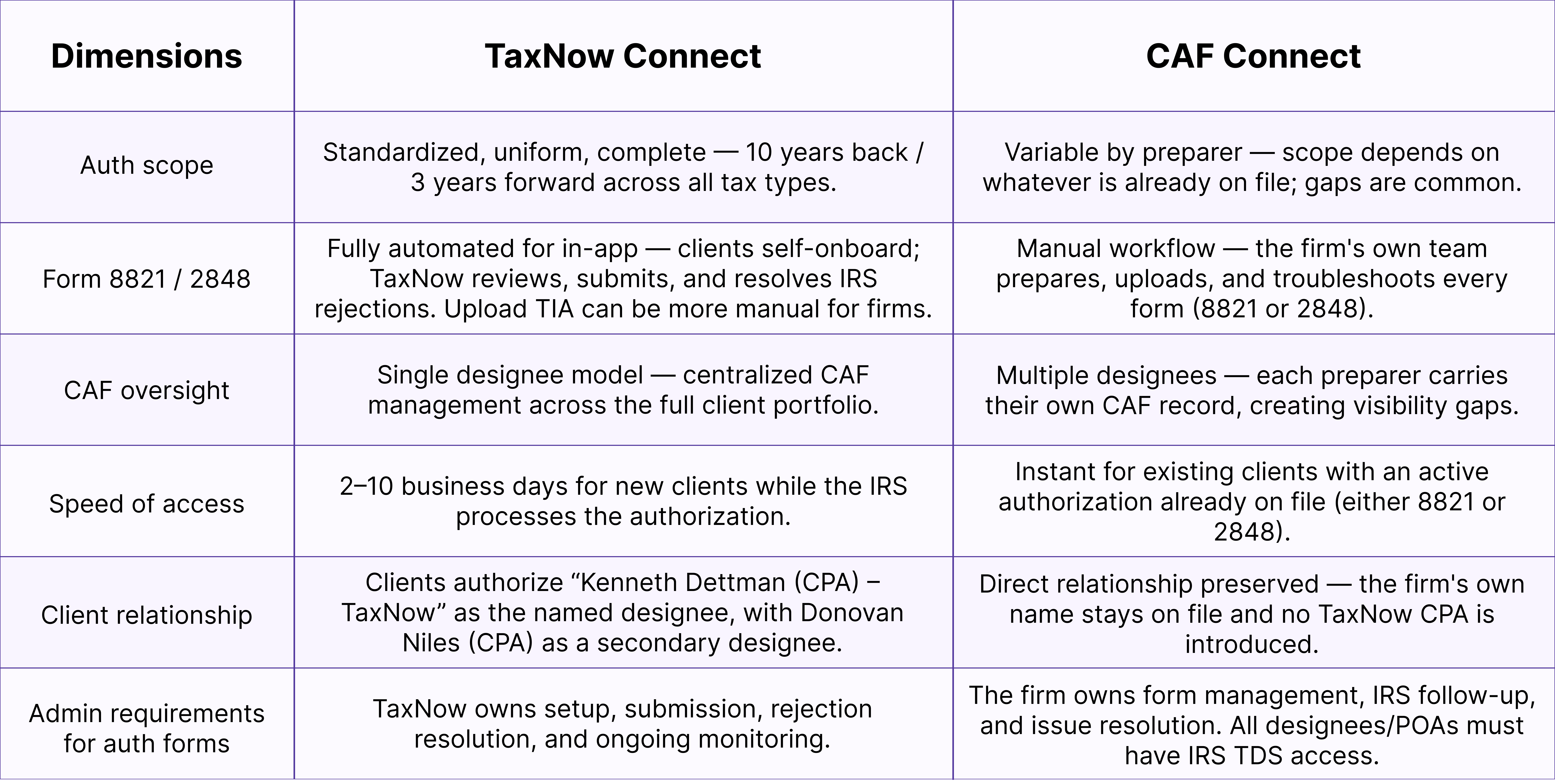
1. TaxNow Connect vs. CAF Connect
TaxNow supports two distinct ways for a firm to establish authorization to access a client's IRS data. Understanding the difference is the foundation for everything else in this guide.
TaxNow Connect
TaxNow's own standard, fully automated authorization flow, which sends TaxNow's designated CPA credentials to the IRS to retrieve client tax data. The client typically e-signs a Form 8821 in-app, naming at least one of TaxNow's designated CPAs as an authorized party, and a firm designee as an alternate (we typically list the firm designee first and TaxNow's designated CPA second). TaxNow submits the form to the IRS and owns rejection resolution and ongoing monitoring end-to-end. Because every authorization is generated the same way, scope is always complete and uniform — 10 years back, 3 years forward, across virtually all relevant tax types (e.g., income, payroll, civil penalty, information returns, etc.).
Note: TaxNow Connect also supports firms that wish to prepare pre-templated 8821s outside of TaxNow's system and then upload them using the “Upload TIA” tool. Firms using Upload TIA are responsible for meeting IRS identity-verification standards and/or collecting “wet” signatures from their clients, and for troubleshooting any Form 8821 rejections (e.g., bad TIN, incorrect signatory title, etc.)..
CAF Connect CAF Connect lets a firm's tax professionals use IRS authorizations already on file — an existing Form 2848 or Form 8821 registered under the firm's own CAF number — to connect a client to TaxNow with no new signature required for pre-existing authorizations. This is faster for clients the firm already has authorization for, but it inherits whatever gaps, inconsistencies, or missing scope already exist in the firm's real-world CAF records.Importantly, CAF Connect isn't limited to authorizations a firm already holds. Firms can also use it prospectively: as new 8821s or 2848s are properly obtained and posted with the CAF Unit going forward, they connect automatically — no new TaxNow-specific signature or paperwork required. Many firms also prefer this path for a second reason: it keeps their own name on file with the client rather than introducing a TaxNow designee.
Key takeaway: TaxNow Connect trades a short IRS processing delay for guaranteed, complete, centrally-managed authorization. CAF Connect trades that delay for speed — but only delivers reliable, continuous monitoring if the firm's underlying CAF records are accurate and complete.
2. Prerequisites to Use CAF Connect
Before a firm can connect any client through CAF Connect, three things need to be true: 1. At least one Pro at the firm must have a CAF number, along with an “active” client authorization (Form 2848 or 8821) already on file with the IRS CAF Unit. Note: for CAF Connect purposes, only an individual tax professional's CAF number is supported — business CAF numbers are uncommon and difficult to obtain and connect to a TDS account. 2. That Pro must have access to the IRS Transcript Delivery System (TDS). In practice, this usually requires Circular 230 status — i.e., being an attorney, CPA, EA, or other Circular 230 practitioner. 3. The Pro must apply for a User ID (UID) through the IRS API Consent Portal (steps below), which links the firm's IRS authorization to TaxNow.
If any of these three are missing, CAF Connect cannot function correctly — this is worth confirming with a new partner or firm before troubleshooting anything else.
It's also important to understand what information is transmitted when TaxNow requests transcript data from the IRS: 1) Taxpayer Name 2) Taxpayer ID (SSN, ITIN, or EIN) 3) Years/Forms Requested 4) Central Authorization File (CAF) NumberIf any of the above are incorrect or invalid, the request will fail.
3. The Core Challenge: Scope Management
The single biggest reason CAF Connect underperforms for a firm is what we call Scope Management: knowing which authorizations — 2848 or 8821 — are actually posted with the IRS CAF Unit, as opposed to authorizations the firm merely possesses or has referenced verbally with the IRS.
Possession is not the same as posted
Having a signed 8821 or 2848 “in the desk drawer,” or having faxed it in during a call with the IRS Practitioner Priority Service (PPS) line, does not mean it is actually on file with the CAF Unit. Only a form that has actually posted with the CAF Unit will support a reliable, ongoing TaxNow connection.
Even PPS “forward to CAF Unit” requests often fail
When a PPS representative offers to forward an authorization to the CAF Unit during a call, that request has a notably high failure rate in practice. Don't treat a verbal PPS confirmation as proof that an authorization was filed or is posted. The most reliable path: the IRS's own upload toolSubmitting the 8821 or 2848 directly through the IRS's online upload tool is the most reliable way to get an authorization posted to the CAF Unit. Where possible, this should be the default method — not a phone call, a fax, or snail mail.
Watch for wrong-title rejections
A common cause of upload rejections is an incorrect signer title relative to the entity type (e.g., using a corporate officer title for an LLC member, or vice versa). This is the same signatory-title issue covered in TaxNow's Form 8821 Troubleshooting Guide, and it's just as relevant when a firm is preparing its own 2848 or 8821 outside of TaxNow.
Overlapping authorizations can bump an earlier one
If a second tax pro later files an 8821 or 2848 covering a period that overlaps with an authorization already on file, the first pro's authorization can get bumped out — unless the second pro explicitly attaches the first pro's form to their filing and checks the box to retain prior authorizations. Firms with multiple preparers touching the same clients need to be deliberate about this.
Scope gaps
Tax pros often use Form 2848 to address specific tax years and forms rather than a broad range. It's uncommon — and arguably a material compliance risk — to file a Form 2848 with very wide scope. As a result, a tax pro may be able to access some tax forms and periods through CAF Connect while remaining unaware of their “blind spots” elsewhere. It's worth periodically reviewing the in-app CAF Check tool to see what gaps in scope may exist.
4. Why This Especially Affects API Partners
Firms integrating through an API partner tend to feel these gaps more acutely than firms using TaxNow's own in-app tools, particularly since they don't have direct access to the in-app CAF Check tool. Most Pros historically obtain a Form 2848 reactively, only when actively working a specific IRS issue, and are inconsistent about the scope (years and forms) they request. That pattern works fine for a one-off IRS call. It does not work well as the foundation for continuous, proactive monitoring, because the underlying authorization coverage is inconsistent and full of unknown gaps.In our experience, the great majority of these issues come down to a firm assuming an authorization is on file with the CAF unit when it actually isn't — not a defect in TaxNow or the API integration itself.
5. Recommended Best Practices for Firms
Use one consistent designee
Rather than having each individual preparer serve as their own designee, designate one consistent person or role across all new 8821s and 2848s going forward. This avoids a “spiderweb” of overlapping, per-preparer CAF relationships that are difficult to track and reconcile. Note:a firm can list multiple designees on a single form, so consider naming both the firm's consistent designee and the client's actual relationship partner or preparer on each new authorization.
Note:TaxNow can technically support multiple CAF Connect designees per firm — this is a firm-organization best practice, not a product limitation.
The consistent designee should generally be a senior-level leader at the firm who is expected to remain there for at least three more years — since a designee who later leaves the firm recreates the same tracking problem this practice is meant to avoid. Default to a “blanket” 8821, add a 2848 only as needed
Establish a broad, expansive-scope Form 8821 as the default baseline authorization for every client. Reserve Form 2848 for specific matters that genuinely require the power to act on the client's behalf, and request it only as needed — since 2848s are harder to keep consistently scoped and are typically pulled together reactively.
Build 8821 collection into annual procedures
To maintain consistent scope across the full client base, firms should consider building Form 8821 collection into their annual procedures — either at engagement renewal (e.g., alongside engagement letters) or as part of the tax preparation engagement itself (e.g., with the PBC/organizer request, or when collecting signatures for returns/Form 8879). Note: it's only necessary to refresh an 8821 every 3–4 years, since the IRS allows a scope that extends up to three tax years beyond the current calendar year.
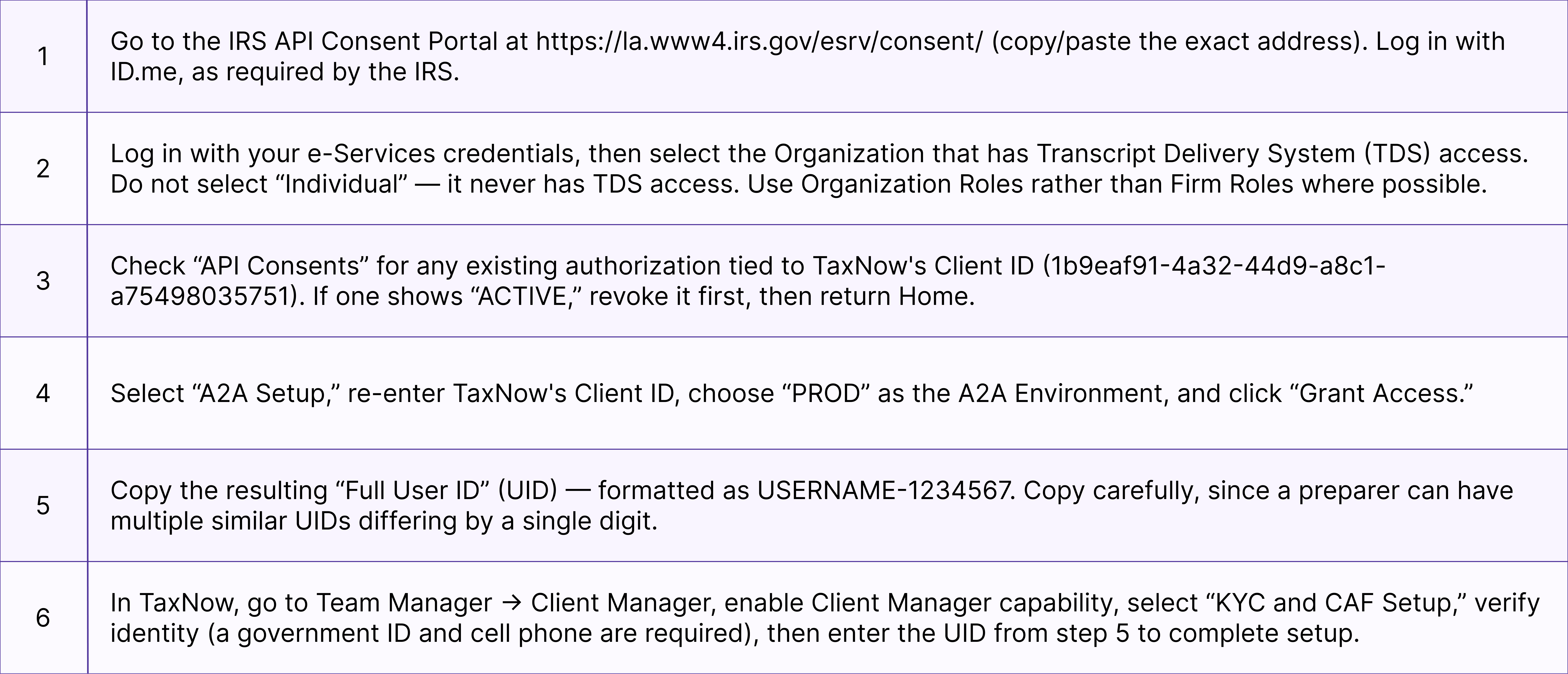
6. Setting Up CAF Connect: IRS API Consent Portal
These are the mechanical steps a Pro follows to connect an existing IRS authorization to TaxNow via CAF Connect. This same process is also used to reset a UID for an existing user.
7. Troubleshooting: When a Pull Fails
This is the decision tree to work through any time a CAF Connect connection or API pull isn't returning data — particularly relevant for API partners sending IRS credentials programmatically.
Step 1 — Confirm A2A access exists
If there's no A2A access at all, one of two things happened: the wrong CAF was used during setup, or the correct CAF was used but the A2A UID setup was entered incorrectly. TaxNow provides this check in-app, and can offer a webhook for API partners to validate A2A status programmatically.
Step 2 — If A2A is confirmed correct, but the pull still fails
1. Check the Pro's IRS Tax Pro Account (irs.gov) first. This shows the Pro's own CAF and every live authorization on file with the IRS. Note: this tool has no search function for taxpayers, so it requires paginating through the full list, and takes several clicks to reach the actual 8821/2848 detail — but it's the right first stop to confirm whether an authorization is genuinely on file.
2. If the authorization does show up in Tax Pro Account, have the Pro test the same pull directly in their own IRS Transcript Delivery System (TDS) account.
3. If the Pro gets a “pass” (successfully retrieves the transcript) directly in TDS, but the pull still fails in TaxNow, that points to a genuine TaxNow-side issue — please report it to your TaxNow customer success or CX contact.
4. In practice, if the failure is consistent (e.g., it fails on repeated attempts), it is almost always a Pro-side credential or authorization issue, not a TaxNow issue. Note: the IRS systems TaxNow relies on can occasionally experience downtime, which typically causes uniform failures across all transcript requests rather than an isolated one.
Quick Reference Checklist
• Confirm CAF number, TDS access (Circular 230), and UID are all in place before onboarding a firm to CAF Connect. • Have each firm take time “mapping” its current client authorizations to the tax professionals who have (or will soon have) TDS access. • For future authorizations, use the IRS's own upload tool to post 8821s/2848s — don't rely on a desk-drawer copy or a verbal PPS reference. • Double-check signer titles against entity type before submitting any authorization. • When filing a new authorization that may overlap with an existing one, attach the prior form and elect to retain prior authorizations. • Standardize on one consistent designee across the firm rather than per-preparer CAF relationships. • Default to a blanket 8821; add a 2848 only when a specific matter requires it. • Periodically review the in-app CAF Check tool to catch scope gaps before they cause a failed pull. • When a pull fails: check A2A → check IRS Tax Pro Account → test directly in TDS → conclude Pro-side vs. TaxNow-side.